
The short answer: building a website takes four decisions. First choose the type of site (brand website, catalog site or online store), then choose a build method (AI site builder, template, custom agency or WordPress), then complete five steps (buy a domain, set up hosting, design the site, do SEO, publish), and budget for the fixed yearly domain and hosting fees. Your official website is your storefront on the internet, and it works like a physical shop: you need a location (domain), land (hosting), interior design (web design) and foot traffic (SEO).
Before the internet became widespread, opening a shop meant finding a good location, renting it, fitting it out and then opening the doors. Opening a shop online means building a website. Owning a website costs money too, including the rent you pay your landlord (domain fee plus hosting fee) and the building management fee (information security). This article explains what to prepare before building a site, which methods are available, and the pricing, pros and cons of each platform.
Part 1: What kind of website do you want? 3 website types
The most important question before building is what kind of website you need. Just as one tenant opens a restaurant and another opens a gym, if you do not decide first, you may finish the fit-out and find the layout is unusable, and changing it later is very troublesome. Websites fall into three main types:
Part 2: How do you build a website yourself? 4 build methods
Building a website is like buying clothes: you can buy ready-made clothes for a few hundred dollars, or order a custom suit for tens of thousands. With the arrival of AI, building an official website has become much easier. One warning: free options are often the most expensive. Most free site builders make money from later add-ons, every new feature needs a plugin, and the small charges add up to something that is not necessarily cheaper.
Method 1: AI site builder
An AI site builder works like hiring a web agency: the more detail you give, the more accurately the AI generates your site, and it can help with content editing and image replacement afterward. You only need to answer a few questions:
- What industry is the website for?
- What features does it need? A brand site, online store, booking site, online course site, and so on.
- Do you have a style you like? You can paste a URL for the AI to reference.
- What theme colors do you want? For example warm milk-tea brown or fresh earth green; exact color codes are best.
- Which pages do you want? About us, success stories, services, product introductions and so on.
Recommended AI site builders: Cmini, Lovable.
Method 2: Template site
If your needs are very simple and you do not care much about design, you can pick a template and generate a site directly. Template platforms include Wix, Webnode, Shopify and Shopline. The downside is little flexibility when you want to change the layout later, and the site format is not always SEO-friendly. Recommended template platforms: Wix, Shopify, Shopline.
Method 3: Custom web design agency
Handing your needs to a design agency is the easiest route, but also relatively expensive. A custom official website usually costs over NT$100,000, and NT$200,000–400,000 is possible with complex features. At the start someone is always on call and changes are easy, but after the final payment, ongoing maintenance is what matters: if you are not familiar with the back end and the engineer does not reply to messages, even updating information on your site becomes hard.
Method 4: Build it yourself
People who know a programming language can hand-build an official website; for those who do not code, the easiest self-hosted option is WordPress. WordPress has the largest market share of any site-building platform in the world, with tens of thousands of themes and plugins and a rich ecosystem, and it can build an online store with WooCommerce.
Part 3: How to build a website: 5 steps
Some people wonder whether building a website yourself costs nothing. It does not. Whether a company builds it or you do, two fixed yearly costs are unavoidable: the domain fee (the rent on the house) plus the hosting server fee (the rent on the land).
Step 1: Buy a domain
A domain is like a house number and location: the more prominent, the higher the search volume and the easier to remember, the higher the price. To get your ideal domain name, you may have to compete with thousands of people worldwide. Even the endings .com and .com.tw differ greatly in value, like a street versus an alley where prices can differ by double. Domain registrars worldwide include GoDaddy, and some sought-after domains cost millions of NT dollars.
An example: when Alibaba was founded, it found that Alibaba.com was already registered, so it first used alibabaonline.com and later paid a high price to buy Alibaba.com from a Canadian owner. A good domain is valuable.
Step 2: Set up hosting (a server)
Once you have chosen the address, you need land to hold the website, which is hosting. The world's biggest "landlords" are Google, Amazon and Microsoft, who have built giant data centers around the world. You rent a small space there for your site, and the price depends on storage size, from a few thousand to tens of thousands of NT dollars a year.
If you do not want to pay rent, you can "buy land" yourself: buy a physical server and install it at home or at the office, at a setup cost of roughly NT$50,000–60,000. But researching hardware takes a lot of time, the server room must stay cool all year, and unless you are a large company the cost is usually not worth it.
Step 3: Web design
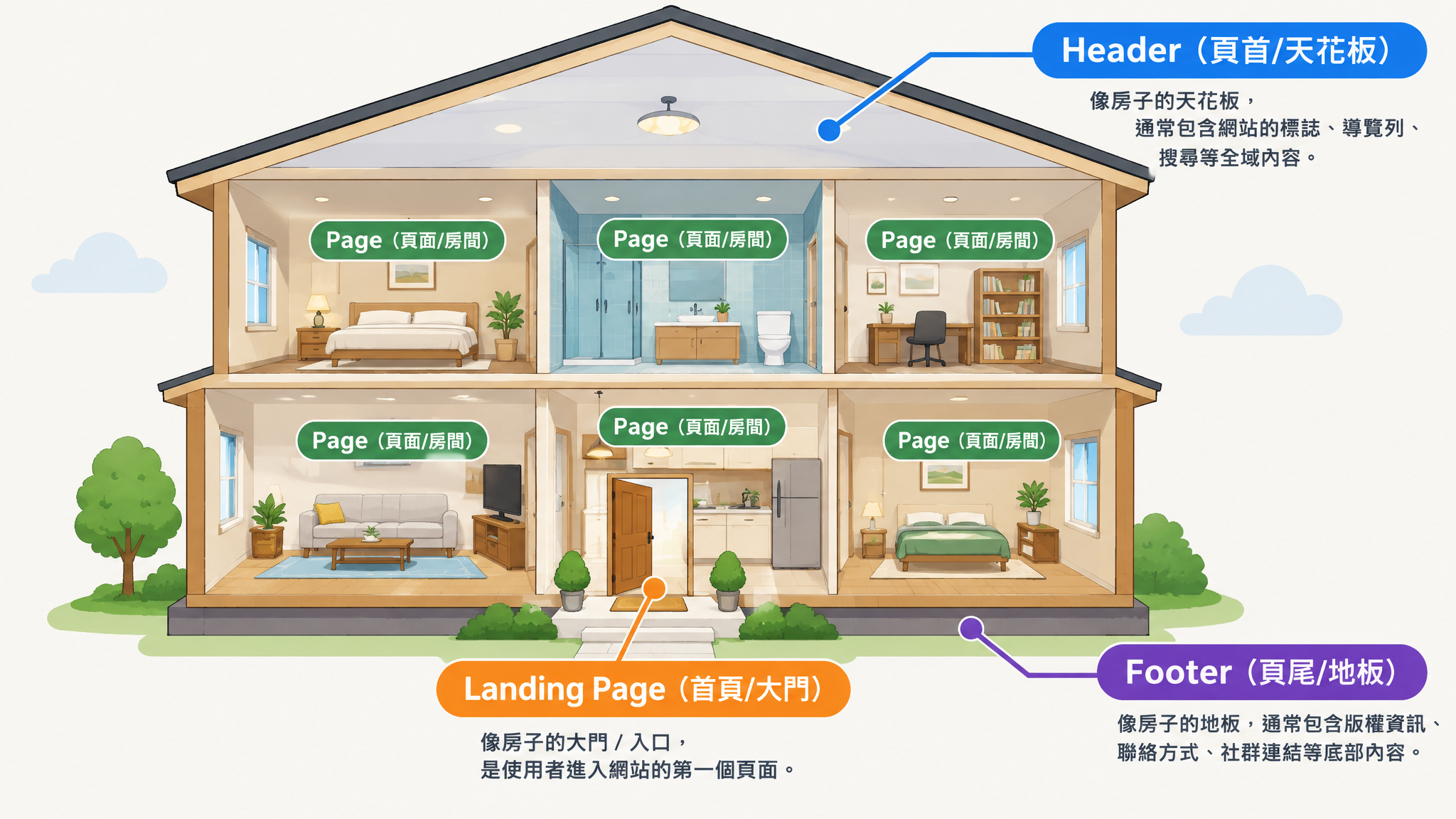
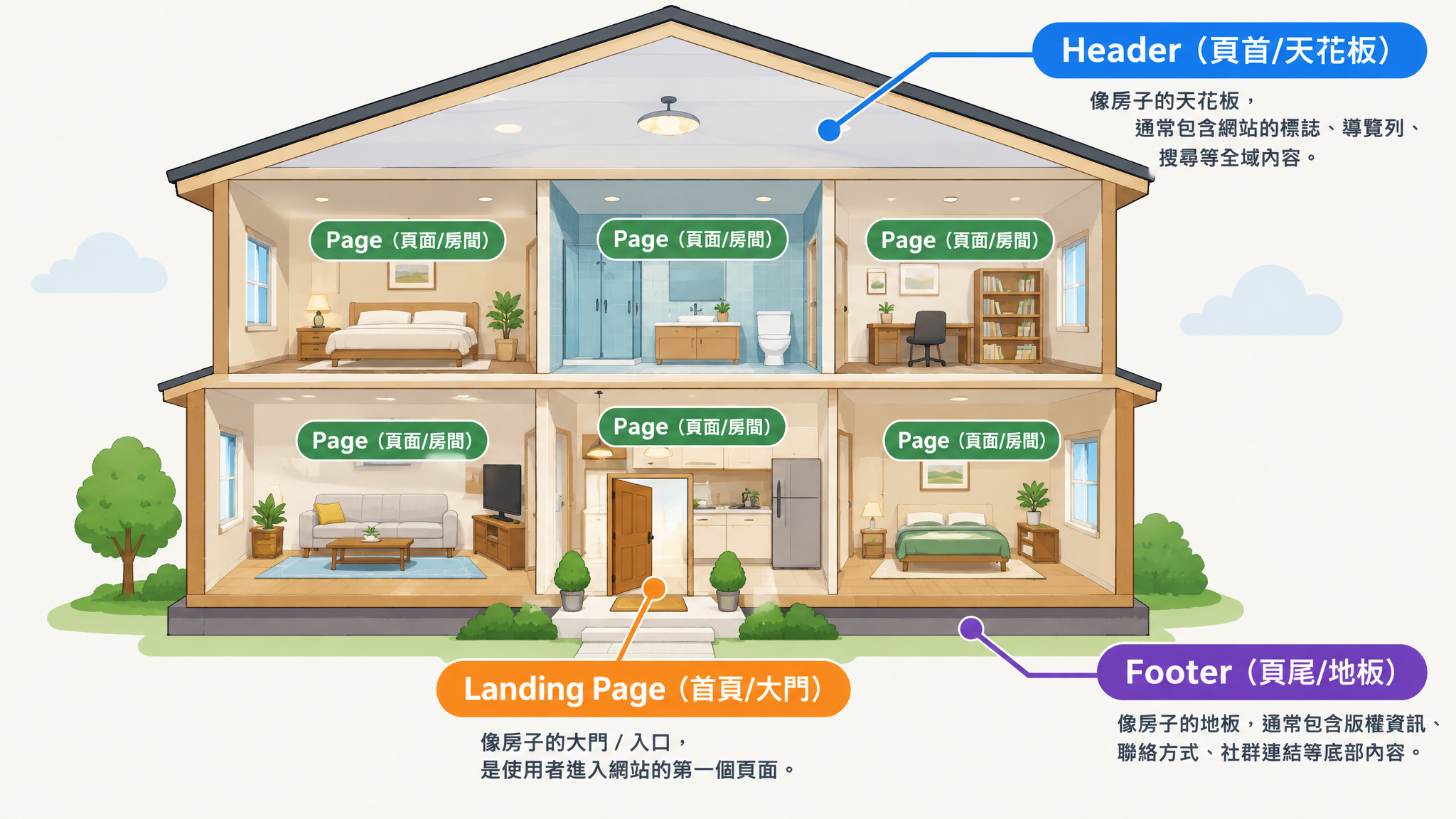
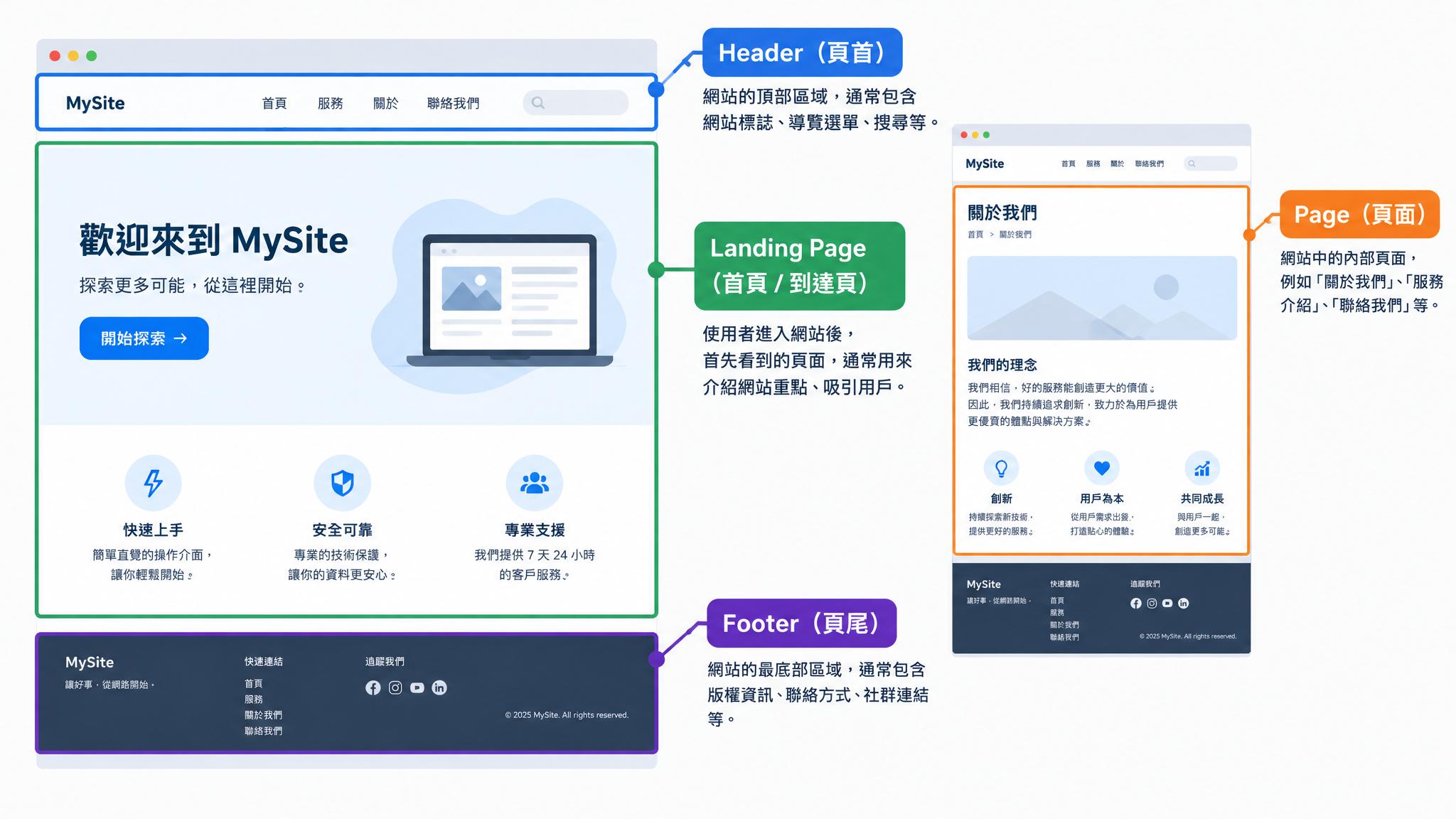
Only after the domain and hosting are settled do you start web design, which is the interior decoration of your site. Good navigation flow keeps users. Web design is like decorating a house, with a ceiling, floor and partitions. The most basic structure includes:
- Front door: home page (Landing Page)
- Ceiling: header
- Floor: footer
- Partitions: pages
Step 4: Do SEO properly
After the shop opens, the flow inside affects customer traffic. Your site should offer a good user experience so visitors can find what they need; articles should have internal links; and content should be easy for Google's crawler to read and something AI is willing to index. Recommended SEO tools: Yoast SEO, Rank Math, Ahrefs.
Step 5: Publish the site and notify Google
A website is not only for people; search engines must be able to understand it too. After building the site, you need to ring the doorbell and tell Google there is a new website, so that Google adds it to search results. To do this, submit it in Google Search Console and ask your engineer to generate a sitemap (Sitemap) for the site.
Part 4: Platform pricing overview
The table below summarizes each platform's starting price, based on official public information compiled in the original source. Actual costs vary with region, exchange rate and promotions, so please check each platform's official site before you buy.
Part 5: AI site builder platforms compared
Readdy.ai
Positioning: Good for quickly building brand sites, landing pages and portfolios; it also offers a back end, forms and AI reception features.
Pricing:
- Free: US$0, but does not include a production hosted site.
- Starter: US$25 monthly; about US$15/month billed yearly.
- Pro: US$40 monthly; about US$24/month billed yearly.
- Agency: US$120 monthly; about US$72/month billed yearly.
- Agency Pro: US$199 monthly; about US$119/month billed yearly.
- Extra sites from about US$6/month.
Pros:
- Enter text to quickly generate a complete site; the visual result usually looks more designed than traditional templates.
- No coding background needed, suitable for validating a brand concept and quickly making proposals.
- Paid plans include custom domains, form lead collection and a built-in back end.
- Higher plans offer GitHub, code export, white label and client management.
- You can edit the site directly through conversation, which is fast at the start.
Cons:
- AI generation, regeneration and edits all consume credits, which can run out quickly with repeated tweaks.
- Complex sites can still have broken layouts, errors, or changes to one part that affect other blocks.
- The free plan is more of a trial tool; going live still requires payment.
- The platform is relatively new, and its third-party integrations, tutorials and developer community are less mature than Wix or Shopify.
- Subscription and credit rules need careful attention.
User review summary: Users generally praise it as easy to start with, fast at generating and nicely designed, but some report system errors, crashes, and credit management and subscription cancellation that are not intuitive. At the time of checking, Trustpilot showed about 3.4/5 from 57 reviews; the sample is small, so the score alone should not settle the question.
Lovable
Positioning: Closer to an "AI web application development platform" than a typical AI website tool, suited to building MVPs, member systems, SaaS, database apps and internal tools.
Pricing:
- Free: US$0, with limited daily/monthly credits.
- Pro: US$25/month, including 100 credits.
- Business: US$50/month, including advanced permissions and team management.
- Yearly billing usually saves about two months; usage, Cloud and AI features may incur extra charges.
Pros:
- Generates the front end, login, database and basic business logic directly from a text description.
- Very good for quickly building an MVP, faster than coding from scratch.
- Connects to GitHub and gives you the code, so it is less of a lock-in than fully closed site builders.
- Supports team collaboration, custom domains and design systems.
- Users without an engineering background can quickly build a working product prototype.
Cons:
- Credits are consumed by task complexity, so costs are not always easy to predict.
- AI edits can sometimes break features that were working, so complex projects especially need version control.
- Data permissions, security, payments and personal data handling should still be reviewed by an engineer.
- It suits "web applications"; for a simple brand website, cost and maintenance complexity may actually be higher.
- Once you scale up, you also need to consider the database, hosting, third-party APIs and maintenance costs.
User review summary: Praise centers on "turning an idea into a working product in minutes," "an intuitive interface" and "greatly shortening prototype development time." Complaints are mainly that credits are used up quickly, AI edits break existing features, and development skills are still needed as projects grow. At the time of checking, Trustpilot showed about 4.2/5 from nearly 1,900 reviews.
Part 6: Brand website platforms compared
Wix
Pricing:
- Light: about US$17/month.
- Core: about US$29/month.
- Business: about US$39/month.
Pros:
- Drag-and-drop editing is very flexible, and templates, apps and tutorials are very complete.
- Hosting, SSL, forms, SEO, blog, booking and basic e-commerce can be managed in one place.
- After the AI builds the site, you can still enter the visual editor to adjust it.
- Suits restaurants, studios, portfolios, event sites and small and medium business sites.
Cons:
- High editing freedom also makes inconsistent layouts easy, and the mobile version needs extra fixing.
- Apps, domain renewals, email and advanced features can add long-term costs.
- Each website usually needs its own plan.
- Moving away from Wix is not as easy as from WordPress or a source-code site.
Webnode
Pricing:
- Limited: from about US$4.50/month.
- Mini/Standard: from about US$8–13/month depending on region.
- Profi: about US$22.90/month, billed yearly.
- Prices differ by region and by website/store plan.
Pros:
- Simple to use and fast to build, with a lower learning curve than Wix.
- Standout multilingual features, good for international brand sites.
- Hosting, SSL, forms, email and basic SEO are managed together.
- Clean templates that are enough for small businesses and personal sites.
Cons:
- Design freedom, app ecosystem and advanced marketing tools are weaker than Wix.
- Lower plans have limits on traffic, storage, email and brand removal.
- Less flexibility for custom code and complex features.
- Suits simple sites, not feature-heavy platform projects.
Squarespace
Pricing:
- Basic: about US$16/month.
- Core: about US$23/month.
- Plus: about US$39/month.
- Advanced: about US$99/month.
Pros:
- Excellent template quality, especially suited to portfolios, photography, design, dining and boutique brands.
- Mature responsive design makes it hard to produce an overly messy site.
- Built-in blog, booking, newsletters, analytics and basic e-commerce.
- Compared with the highly free Wix, it is easier to keep the overall look consistent.
Cons:
- Freedom over blocks and layouts is still limited by the platform's framework.
- Some marketing, code injection and e-commerce features need a higher plan.
- The third-party extension ecosystem is smaller than Wix, WordPress or Shopify.
- User opinions on customer service, domains, DNS and billing are mixed.
Strikingly
Pricing:
- Pro: US$16/month.
- VIP: US$49/month.
- Domains from about US$24.95/year.
Pros:
- Very fast for making one-page sites, event pages and resume sites.
- A simple editor that people without design or technical backgrounds can use easily.
- Multi-year plans have a lower monthly cost.
- Hosting, forms, blog and a simple store are integrated.
Cons:
- Limited ability to manage complex navigation, multi-level content and large sites.
- Less design customization freedom than Wix and Squarespace.
- E-commerce, membership and marketing features are basic.
- The lowest price usually requires buying several years at once, so switching platforms is less flexible.
Part 7: Online store platforms compared
Shopify
Pricing:
- Basic: about US$29/month.
- Grow: about US$79/month.
- Advanced: about US$299/month.
- Credit card and third-party payment transaction fees, paid apps, themes and domains are extra.
Pros:
- One of the most mature e-commerce ecosystems in the world, with a complete range of apps, templates, developers and cross-border tools.
- Mature products, inventory, orders, discounts, multi-currency and sales channel features.
- Suits cross-border brands and stores planning continued growth.
- Stable hosting; the company states its main services reached 99.9% uptime over the past 90 days.
Cons:
- Local payment, logistics, invoicing and OMO often need third-party apps or integrations.
- Stacking apps can noticeably raise monthly fees and maintenance complexity.
- Deep customization needs Liquid, front-end skills or a Shopify expert.
- With third-party payment methods, you may pay both the payment fee and Shopify's transaction fee.
SHOPLINE
Pricing:
- Store Explorer: NT$40,000/year.
- E-commerce Strategist: NT$55,000/year.
- OMO Master: NT$68,000/year.
- Omnichannel Navigator: NT$88,000/year.
- A monthly system traffic maintenance fee of about 2% of GMV; about 1.5% on the top plan.
- A brand app can be added, at a public price of about NT$70,000/year plus a NT$10,000 setup fee.
Pros:
- Complete integration of Taiwan payment, logistics, e-invoicing, LINE, live-stream ordering and social commerce.
- A Chinese-language back end and local consultants help merchants get started quickly.
- Complete POS, membership, inventory and online-offline OMO features.
- Suits retail brands whose main market is Taiwan, Hong Kong or Southeast Asia.
Cons:
- Besides the annual fee there are setup fees, GMV maintenance fees, payment and add-on features, so you need to calculate total cost separately.
- Features are spread across different plans, so upgrading midway can cost more.
- Data migration and deep customization are less free than on open systems.
- A yearly contract is costly for startups and leaves no room to experiment.
CYBERBIZ
Pricing:
- Different features cost about NT$28,000–68,000/year.
- Some plans also charge a maintenance fee of about 1% of GMV.
- Enterprise plans use project-based or special pricing and may include a one-time setup fee and a higher system service fee.
- Payment, warehousing, POS, SMS and apps are extra; follow the official quotation.
Pros:
- Complete Taiwan payment, logistics, e-invoicing, POS and membership features.
- Multi-warehouse, purchasing, batch/expiry tracking and WMS smart warehousing are the main strengths.
- Suits brands with more complex inventory, shipping and physical store needs.
- Offers tutorial resources and local support.
Cons:
- Plans, promotional prices, GMV rates and add-ons are more complicated.
- Advanced warehousing and some features still need add-ons.
- Template differentiation and front-end design freedom may be lower than on a highly customized site.
meepShop
Pricing:
- The entry plan's public price is about NT$2,500/month plus a transaction fee of about 1.5%.
- Higher plans swap a fixed fee for a 0% transaction fee.
- The company currently tiers plans as Silver Lamp, Gold Lamp and Diamond Lamp, differing mainly in transaction fee, product count and traffic.
Pros:
- Core back-end features are mostly open on every plan rather than tiered by feature.
- High page editing freedom, with drag-and-drop brand layouts.
- Complete payment, logistics and Taiwan e-commerce features.
- You can choose a commission plan or a no-transaction-fee plan based on revenue.
Cons:
- The entry plan charges a transaction fee, so total cost rises quickly as revenue grows.
- There may be extra charges for excess traffic, payment and add-ons.
- The company does not issue invoices on your behalf, so merchants must integrate or handle invoicing themselves.
BV SHOP
Pricing:
- The main plan is about NT$4,583/month, roughly NT$55,000/year.
- Marketed as full-featured, a single plan and 0% platform commission.
- POS, hardware, web design, payment, logistics, invoicing and custom integrations are extra.
Pros:
- A single plan is easy to understand, with no need to upgrade feature by feature.
- 0% platform commission suits brands with stable revenue.
- Complete payment, logistics, membership, promotions, reviews and custom CSS features.
- Offers POS and OMO integration.
Cons:
- The fixed annual fee is high for small sellers who are just testing a market.
- POS, design, hardware and third-party services can still add cost.
- The app ecosystem, cross-border scale and developer community are smaller than Shopify's.
EasyStore
Pricing:
- Standard: NT$1,399/month when billed yearly.
- Business: NT$2,799/month.
- Growth: NT$5,399/month.
- All-in-one: about NT$6,999/month.
- The company markets 0% platform transaction commission on all plans.
Pros:
- No platform transaction commission, so costs are relatively predictable.
- Supports online stores, social, marketplaces, live streaming, POS and multiple sales channels.
- Stronger in Southeast Asia and cross-border features.
- The yearly entry price is lower than most Taiwan OMO platforms.
Cons:
- Payment, logistics, SMS, apps and third-party services still incur fees.
- Advanced membership, revenue sharing, POS and apps need a higher plan.
- Deep customization and special business processes still need to be checked for support.
Part 8: Which platform should you choose? Quick match by need
Frequently asked questions (FAQ)
Q1: Is building a website myself really free?
No. Whether you build it yourself or hire a company, there are always two fixed yearly costs: the domain fee and the hosting server fee. Hosting costs depend on storage size and can run from a few thousand to tens of thousands of NT dollars a year; free site builders also often generate costs later through plugins and add-on features.
Q2: Which build method suits someone with no coding background?
AI site builders and template sites suit you best. With an AI builder you only answer a few questions to generate a site; with a template site you simply pick a template, though you have less flexibility to change the layout later.
Q3: How much does a custom website design cost?
Usually over NT$100,000, and NT$200,000–400,000 is possible with complex features. After the final payment, if you are not familiar with the back end and the engineer does not reply, later changes become very hard, so confirm the maintenance arrangement before signing.
Q4: Will Google index my website automatically once it is built?
Not guaranteed. Notify Google of the new website through Google Search Console and ask your engineer to generate a sitemap (Sitemap); that makes it easier for Google to add your site to search results.
Q5: Is buying my own server cheaper?
Usually not, unless you are a large company. A physical server costs roughly NT$50,000–60,000 to set up, takes time to research the hardware, and the server room must stay cool all year.
Conclusion: clarify your needs first, then choose a method and platform
The order for building a website is: decide the website type first, then choose the build method, and finally pick a platform by budget and features. Whichever you choose, budget for the yearly domain and hosting fees, and after launch do SEO and submit to Google Search Console with a sitemap, so that search engines and AI can find and understand your content.